

You usually notice the Dubai Chamber login when something urgent is already on your desk. A shipment needs support documents. A partner asks for chamber-backed paperwork. Your PRO says an application is pending and someone on your team can't access the portal.
At that point, the login stops being an admin detail. It becomes part of how your company moves. In Dubai, founders who treat chamber access as core business infrastructure usually make cleaner handovers, faster submissions, and fewer last-minute scrambles.
A founder usually cares about the Dubai Chamber login at the worst possible moment. A bank asks for supporting paperwork. A customer needs chamber-backed documents. A shipment is waiting on a certificate. In those moments, portal access affects speed, credibility, and who on your team can get work done.
That is why I treat this login as an operating asset, not a minor admin credential.
The practical value is simple. Your chamber account sits in the path of official business tasks that outside parties take seriously. If access is poorly managed, small issues turn into delays. If access is set up properly, your team can submit documents faster, recover account problems without drama, and avoid pulling the founder into routine approvals.
For UAE startups, this matters early. The company may still be small, but counterparties already expect formal paperwork, accurate records, and quick turnaround. Chamber access helps you meet that standard. It also supports how the business is perceived. A founder with organised chamber access usually runs cleaner operations than a founder who is still searching inboxes for an old password every time a request comes in.
Dubai Chambers continues to add new members each year, according to its recent annual reporting. The exact number matters less than the operational takeaway. You are working inside a system used by a very large base of businesses, and many of those interactions involve time-sensitive formalities. Slow access is not a branding problem. It is an execution problem.
Practical rule: If a portal affects customer documents, trade paperwork, or third-party trust, give it the same ownership discipline you give your banking access.
Set one primary owner. Assign a backup. Keep recovery details current. Document who can log in, who can approve, and where renewal or member records are stored. That sounds basic, but it prevents the usual founder bottleneck.
If you are still placing the chamber inside your wider company setup, this Dubai Chamber of Commerce directory guide gives useful context.
A founder usually notices the difference between these access routes at the worst moment. A certificate is needed today, a client is waiting, and the person handling the task is trying to do it from a phone in the back of a taxi. The login route you choose affects speed, error risk, and how much back-and-forth your team creates.

For most founders, the web portal should be the default.
It gives the clearest view of your records, attached documents, and submission steps. If you are handling a formal request, checking company details, or reviewing something that could delay a transaction, desktop access is usually the safer choice. I recommend it for first-time submissions and anything tied to external deadlines.
A reliable desktop routine is simple:
That last point matters more than founders expect. Half-finished sessions, multiple open tabs, and saved credentials from the wrong user create avoidable errors. If your team is still setting up the company properly, this Dubai Chamber registration guide for new businesses helps put the portal access in context.
Mobile access is useful, but it has a narrower role.
Use it for quick checks, status confirmations, and basic follow-up while moving between meetings. It works well when a founder needs to confirm that a request was submitted or approve something simple without opening a laptop. It is less forgiving when the task involves several uploads, careful field review, or a first-time filing where one mismatch can create extra support work.
That is the trade-off. Mobile is faster to open. Desktop is usually better for accuracy.
Use the app when:
The third route is assisted access through a kiosk or member service point. Early-stage teams often ignore this option until something breaks.
It is not the fastest path for daily use, and it should not be your operating model. It does help when login issues are blocking a time-sensitive task, when a junior staff member needs guidance on a first submission, or when you want clarity instead of guessing through a portal problem. For a founder trying to protect turnaround time, that support can be worth the extra coordination.
Here is the practical comparison:
| Pathway | Best for | What to watch |
|---|---|---|
| Web portal | Full submissions, detailed review, admin control | Browser issues, stale sessions, and wrong-user logins can interrupt the process |
| Mobile app | Status checks, simple approvals, quick follow-up | Better for light tasks than document-heavy submissions |
| Kiosk or assisted access | First-time users, support-heavy cases, login friction | Requires physical presence and extra scheduling |
Choose the path based on the task, not habit. If the work affects customer documents, approvals, or company records, the fastest option is the one that gets it right on the first pass.
You feel the value of this login on the day you need something processed fast. A founder gets asked for a chamber document, a banking follow-up lands, or a customer wants proof that the company record is in order. If the account is already set up properly, the task moves. If it is not, a small admin job turns into a half-day distraction.

The first account should be built for continuity, not convenience. Founders often grab the nearest email address, rush through the form, and assume they can clean it up later. That choice usually creates friction at the worst time, especially when someone leaves the business or a sensitive submission needs the right owner to approve it.
Use details that will still make sense six months from now. Keep your trade licence, company name, contact information, and authorised representative details in front of you before you start. Small mismatches in spelling or contact data are the kind of problems that slow down follow-up work.
A clean setup usually means:
As noted earlier, new account applications are typically reviewed quickly when the submission is complete. That matters because the login is tied to real operating speed. If the setup is correct on the first pass, you can often move from account creation to the actual chamber task in the same work session.
That is an important reason to treat this carefully. The portal is not only a place to sign in. It is part of how your company proves status, requests documents, and keeps routine admin from dragging into tomorrow.
I usually tell founders to pause for five minutes before submitting and ask one question. Who should still control this account if the person handling setup is unavailable next month? That answer prevents a lot of avoidable mess later.
If you want a broader view of the setup around membership and related admin, this Dubai Chamber registration guide is worth bookmarking.
A short video can also help if someone on your team prefers to see the flow before they touch the portal:
A founder usually notices login trouble at the worst moment. You are about to pull a chamber document, renew something time-sensitive, or hand a file to a bank, and the portal starts looping, rejecting a password, or loading half a page. At that point, the login issue is no longer technical. It is an operations delay.
Most portal problems come from a short list of causes. Browser cache conflicts, bad autofill, expired saved credentials, or repeated attempts from different team members using slightly different details.
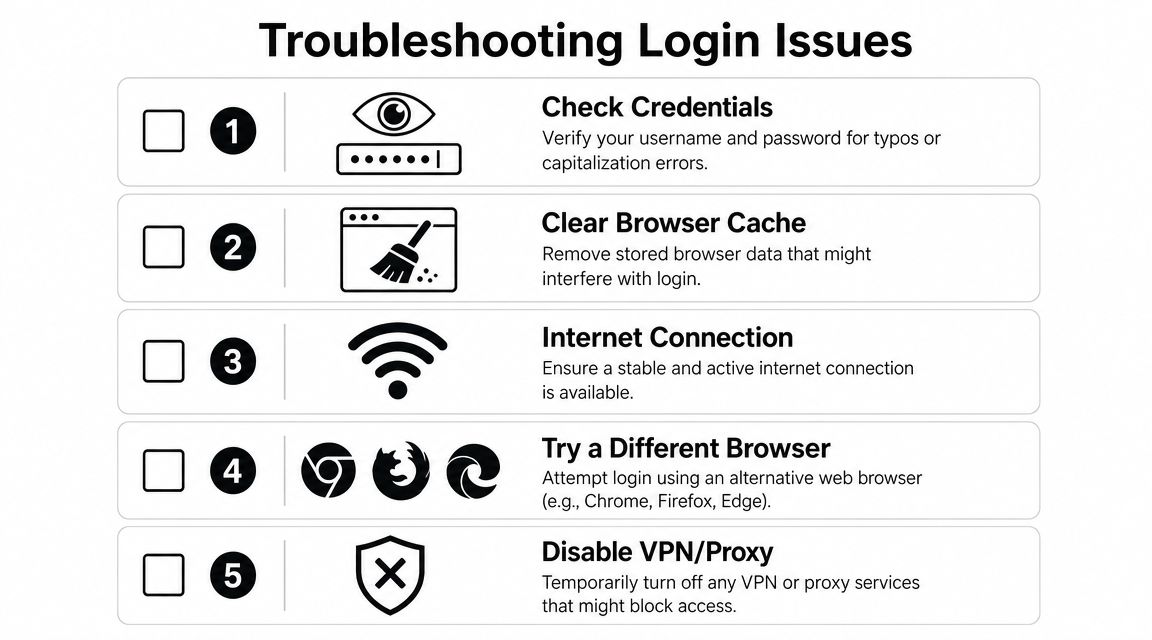
If the page loads incorrectly, buttons do nothing, or the sign-in flow keeps returning you to the same screen, treat it as a browser problem first. As noted earlier, Dubai Chambers recommends clearing cached files and website data when the portal behaves oddly.
That matters because many founders go straight to password resets and create a second problem. They change credentials when the actual issue is an old session stored in the browser.
Use this order:
One clean attempt tells you more than six rushed ones.
Saved passwords cause a surprising amount of wasted time in shared admin environments. A browser may insert an outdated password, the wrong login email, or invisible spacing that looks correct on screen.
I have seen teams lose an hour on this.
Before trying again, manually type the details and confirm the exact email attached to the chamber account. This matters even more if your company uses multiple inboxes for admin, finance, or PRO work.
Use this quick check:
This is the practical split that saves time. If the same login works on another device or browser, the account is probably fine. If it fails everywhere, focus on credentials or account status.
Here is the quickest way to diagnose it:
| Symptom | Likely cause | Best next move |
|---|---|---|
| Page loops or loads incorrectly | Cached session conflict | Clear browser data and restart |
| Password is rejected every time | Old saved password or wrong credentials | Re-type manually, then move to recovery |
| Login worked recently, then stopped | Session issue or account status problem | Test in a fresh browser, then check recovery/support |
| One teammate can log in, another cannot | Device-specific or user-input issue | Compare the exact login path, browser, and email used |
If you need chamber access for a document request, this matters even more. Delays at login often become delays in paperwork, especially when the next task is tied to a Dubai Chamber certificate process in Dubai.
The portal is part of how your company proves status and gets documents out quickly. So handle login errors with the same discipline you would use for a banking access issue or a government portal lockout.
Do not let three different people test random fixes at the same time. Use one person, one device, one clean sequence. That approach usually identifies the cause faster and avoids making the account state harder to understand later.
A founder usually notices the value of this login when access breaks at the worst time. You need a chamber document, a partner is waiting, and the delay is no longer an IT annoyance. It is now an operations problem with commercial consequences.

If the account is active and the password keeps failing, go straight to Forgot Password. Repeated guessing wastes time and can make the situation harder to track internally, especially if several people think they know the current password.
Check two things before you start recovery:
After recovery, update the password record at once. If the new password lives only in one employee's memory, the same problem usually comes back during the next urgent filing.
Use official support as soon as the issue affects a live task. Good operators do not wait for the portal to fix itself while a submission window, document request, or client deadline gets tighter.
Contact support if:
The login is tied to your company's speed and credibility. If your team cannot get in, document turnaround slows down, and that can delay work that depends on a Dubai Chamber certificate process in Dubai.
One practical rule helps here. Keep a short internal note with the account owner, recovery email, and support escalation path. Small startups rarely need a complicated access policy, but they do need clarity.
Yes, in practice many founders delegate chamber tasks. The key is control. Decide who owns the primary account, who's allowed to use it, and how password recovery is managed. If you delegate access without documenting ownership, the handover becomes a significant problem later.
Use desktop for anything detailed, sensitive, or upload-heavy. Use mobile for quick status checks and simple follow-up. That split usually reduces mistakes.
That usually points to a device or browser issue rather than a chamber-wide failure. Start with browser cleanup and a fresh session on the affected device.
It matters commercially because it affects access to authenticated services tied to how your company presents itself and gets work done. If external partners, trade processes, or formal documents depend on it, the login has operational weight.
Use one clear owner, one backup person, and one shared process note that explains how to log in, recover access, and escalate support. That's enough for most early-stage teams.
Founder life in the UAE gets easier when you're not solving every operational issue alone. Founder Connects brings founders together for practical support, trusted introductions, and honest conversations that help you move faster with fewer avoidable mistakes.


