

You've just signed a lease, your team starts next week, and somebody drops “just get internet near me” into the group chat as if that's a real procurement process.
It isn't.
For a UAE startup, internet is one of the few office decisions that can break operations on day one. If your team lives in Google Workspace, AWS, Slack, Zoom, HubSpot, Figma, and cloud backups, the wrong line doesn't just feel slow. It blocks sales calls, interrupts support, breaks VPN access, and turns a normal morning into a support escalation.
Most “internet near me” results are built for residential buyers. They focus on headline speed, entry pricing, and generic area coverage. Founders need a different lens. You need to know whether your exact unit is serviceable, whether the provider offers business support, whether you can get a static IP, what the outage process looks like, and how you'll keep the office online when the primary circuit fails.
The first mistake is searching providers before defining requirements. Founders often say they need “fast internet” when what they require is stable video calls, clean cloud app performance, remote access, and enough upload capacity that backups don't interfere with the workday.
That means your starting point isn't a provider website. It's an internal audit.

List the tools your team uses every day. Be specific. “General browsing” tells you nothing. “Google Meet for sales demos, Notion for documentation, GitHub pulls, cloud backups, and VoIP calling” tells you exactly what kind of connection behaviour matters.
Start with these four buckets:
If your team spends most of the day inside browser apps, consistency matters more than a flashy speed number. If you move large files all day, upload performance matters far more than many office managers realise.
Practical rule: Buy internet for your busiest simultaneous hour, not for your quietest average day.
Before speaking to any ISP, write a one-page internal brief with:
This gives you a technical and commercial filter. It also stops you from being sold the wrong plan because somebody only asked, “How many users do you have?”
A lot of “bad internet” complaints are really bad office networking. A weak access point, poor router placement, or cheap all-in-one ISP hardware can make a good line feel unreliable.
If you're fitting out a new office, treat internet and internal networking as separate decisions. Your ISP gets service to the premises. Your own equipment determines whether that service reaches desks, meeting rooms, and phone booths properly. If you're also planning the office setup, this is the same category of hidden infrastructure decision as utilities, access control, and location fit in a property search such as Bayut properties in Dubai.
Ask three questions:
For most startups, the answer to the third question is some combination of support responsiveness, static IPs, and failover readiness.
That's the brief. Not “fast Wi-Fi”.
When founders search “internet near me”, they often get city-wide results, listicles, or provider pages that imply service is broadly available. In practice, that's not how office connectivity works in the UAE.
The most reliable way to find internet in the UAE is to start with address-level availability checks. Major providers' coverage pages are the primary source, as aggregators acknowledge that ZIP-level results can be incomplete. Fixed-line footprints vary by building, so you must narrow by exact address to avoid comparing plans that aren't available at your specific unit (InMyArea availability guidance).
Building-level variation is the issue that trips up first-time founders. Two offices on the same street can have different serviceability, different installation requirements, or different lead times.
Use this workflow:
If you only check by area name, you'll waste time comparing plans you can't order.
Founders in DIFC, ADGM, DMCC, Dubai Internet City, and similar environments should expect extra complexity. Some buildings have preferred infrastructure arrangements, existing riser limitations, or managed connectivity relationships that shape what's available in practice.
That doesn't always mean you have fewer options. It means the shortlist comes from building operations and provider qualification, not from generic search results.
Here's the useful mindset. “Internet near me” for a startup office is not a search problem. It's a building verification problem.
The right first call is often the building management office, not the ISP sales desk.
A broad directory can help you understand categories, pricing styles, and common technologies before you start calling providers. For that purpose, it's useful to compare home internet providers just to see how offer structures differ across access types.
But don't stop there. Broad comparison pages are context tools. They are not proof that your office suite is serviceable.
Use a simple three-column sheet:
| Check | What to record | Why it matters |
|---|---|---|
| Building serviceability | Confirmed yes, no, or pending survey | Eliminates non-options fast |
| Access type | Fibre, fixed wireless, or other | Tells you expected performance profile |
| Business features | Static IP, SLA, business support, install terms | Separates residential-style offers from business-grade service |
Once you've narrowed the field, it helps to talk to an integrator or office IT partner who already knows local building realities. If you're still sorting that side of the stack, a directory of IT networking companies near me is a better next step than reading more generic provider round-ups.
Most founders don't need a lecture on broadband terminology. They need to know which access type fits their business risk.
For UAE businesses, a practical decision framework is to prioritise fibre where available and treat 5G or fixed wireless as a fallback for buildings without fibre. Since provider availability can be building-specific, the most common pitfall is comparing advertised plan speeds without confirming address qualification first. A robust methodology is to confirm serviceability, compare access technology, check latency-sensitive needs, and validate fees before ordering (business internet decision framework).

Headline download speed is the least useful starting point for office buying.
The better questions are:
| Metric | Fiber Optic | Business 5G/LTE | Cable (if available) |
|---|---|---|---|
| Best fit | Primary office connection | Fast deployment, backup, temporary office | General business use where offered |
| Latency profile | Usually strongest for real-time work | Good enough for many teams, but can vary by location and load | Acceptable for standard office tasks, less predictable than fibre |
| Upload behaviour | Often the best choice for heavy cloud and backup use | Useful for moderate workloads and resilience | Can be less attractive for upload-heavy teams |
| Installation | Can take more coordination in business buildings | Usually faster to deploy | Depends on local building support |
| Risk profile | Best for core operations | Best as fallback or fast-start option | Depends heavily on local implementation |
This table won't choose for you. It will stop you from choosing for the wrong reason.
Fibre is the cleanest answer for most offices that run cloud-heavy workflows, regular video calls, and anything latency-sensitive. If your team ships product, handles client calls, or needs stable remote access, fibre is usually the first thing to qualify.
Business 5G or LTE is underrated. It's useful when you need rapid activation, when fibre isn't available in the unit, or when you want a secondary path for failover. It's also the fastest way to get a temporary office online while waiting on a wired install.
Cable, where available, can be perfectly workable for standard office use, but it needs more scrutiny around consistency and business support terms.
If you're designing the office LAN at the same time, it helps to review examples of Constructive-IT's network infrastructure services so you can separate access technology from internal cabling, switching, and Wi-Fi design. Founders often bundle those decisions together and end up blaming the carrier for what is really an internal network bottleneck.
Buy the access type for your critical workload, then size the plan. Most teams reverse that and regret it.
A consumer internet plan sells speed. A business internet plan should sell accountability.
If the office goes offline during a sales day, your problem isn't that the package was marketed well. Your problem is whether the provider has committed, in writing, to support performance, repair handling, escalation paths, and commercial remedies.

A Service Level Agreement is the part of the contract that tells you what the provider is promising after the sale. Founders often hear “business-grade” on the phone and never verify what it means on paper.
Read the SLA for four things:
Service credits won't repay lost revenue, but they reveal whether the provider is serious about contractual accountability.
A lot of early-stage teams dismiss static IPs as something only enterprise IT departments need. That's a mistake.
You should ask about static IP availability if your business uses any of these:
If the sales rep can't clearly explain whether static IPs are available, included, or add-on, you're not talking to the right team yet.
Most outages are judged by one thing. How fast a competent person takes ownership.
Ask directly:
This is also where founders should pay attention to quality symptoms, not just speed tests. On paper, a line can look “up” while still being miserable for calls. If your team depends on voice or video, it's worth understanding delay variation and call instability. A plain-English explainer like SnapDial's guide to network jitter helps non-network specialists ask better questions during procurement.
If your business runs on calls, cloud access, and customer response times, “best effort” support is not a business plan.
Use this before signing:
| Clause or feature | What to ask |
|---|---|
| SLA scope | Does it apply to the full service or only part of it? |
| Support hours | Is support truly business-priority and always reachable? |
| Static IP | Available by default, optional add-on, or unavailable? |
| Router responsibility | Who manages, replaces, and configures edge equipment? |
| Service credits | How are they triggered and how do you claim them? |
| Installation terms | What delays or site dependencies can push activation? |
A provider doesn't need to be perfect. It needs to be honest, contractually clear, and operationally fit for the business you're running.
A single connection is a single point of failure. For a startup office, that's usually an avoidable risk.
Many people searching for “internet near me” are really asking for a practical fallback. This is especially relevant in the UAE, where 5G adoption has grown rapidly, making wireless home or business internet a realistic substitute or backup. The key is to compare these options on metrics that matter for a founder, including latency for video calls, upload speed for file sharing, and installation time (wireless fallback perspective).
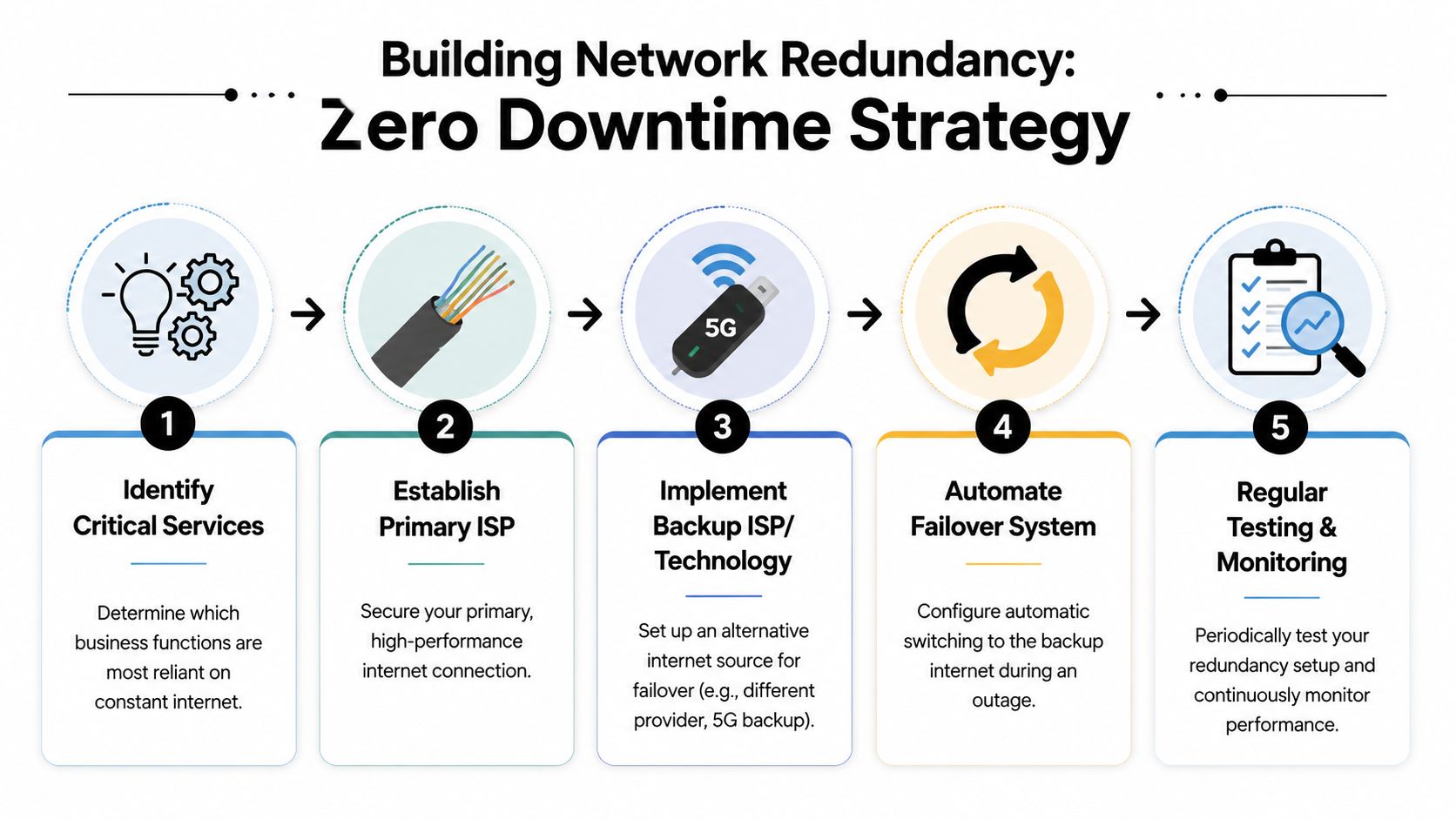
The most sensible setup for many early-stage teams is simple:
That's not enterprise excess. It's operational hygiene.
If your office loses the primary line and everyone starts tethering to personal phones, you've already failed the test. Tethering is improvisation, not resilience.
A better approach is to keep a secondary connection permanently ready. When the primary path drops, your edge device shifts traffic to the backup path. Calls may degrade slightly, but the office stays productive.
This short video gives a useful visual on the thinking behind failover and continuity:
Founders usually make one of two mistakes:
The middle path is better. Put most of the budget into a strong primary connection. Add a lean wireless backup. Configure automatic failover. Test it during working hours, not after an outage.
Hope is not a redundancy strategy. A tested backup path is.
By the time the quote arrives, many founders are tired enough to sign whatever looks reasonable. That's where unnecessary cost creeps in.
In the UAE, the internet market is dominated by two main operators. This can make search results seem thin in true choice. A significant challenge for users is not a lack of providers, but a lack of transparent, building-level guidance on speed consistency, installation feasibility, and actual performance, making diligent vetting necessary (market context for provider choice).
The monthly fee matters, but it's rarely the full commercial picture. Ask for the full cost stack in writing:
A cheap line with painful install conditions or rigid termination terms can cost more than the higher monthly option you initially rejected.
In concentrated telecom markets, the base monthly rate often isn't the easiest lever. You'll usually get more traction on surrounding terms.
Try negotiating these instead:
When you negotiate, use operational reasoning. Don't just ask for “best price”. Say your team has a fixed move-in date, that you need static IP support for remote access, or that you're comparing offers based on business continuity terms.
Use this before approving any contract:
| Decision area | Sign only when this is clear |
|---|---|
| Building fit | Exact unit serviceability confirmed |
| Technology fit | Access type matches your workload |
| Business features | SLA, support route, and static IP terms documented |
| Resilience | Backup plan and failover design chosen |
| Commercial clarity | All fees and contract conditions written down |
If your startup is watching burn carefully, treat internet procurement like any other operating expense category. The right question isn't “what's the cheapest line?” It's “what's the lowest-cost setup that won't disrupt revenue, delivery, or hiring?” The same discipline used in budget allocation strategies for startups applies here.
Your next move is simple. Turn this article into a one-page office connectivity checklist, assign one team member to verify building serviceability, and don't approve a contract until the SLA, backup plan, and commercial terms are all clear.
If you're building in the UAE or wider MENA and want sharper founder-to-founder advice on decisions like office setup, vendors, hiring, and operational trade-offs, Founder Connects is built for that. It's a practical community for founders who want relevant peers, honest conversations, and real progress rather than generic networking.


