

How UAE Tech Startups Localize SaaS for New Markets
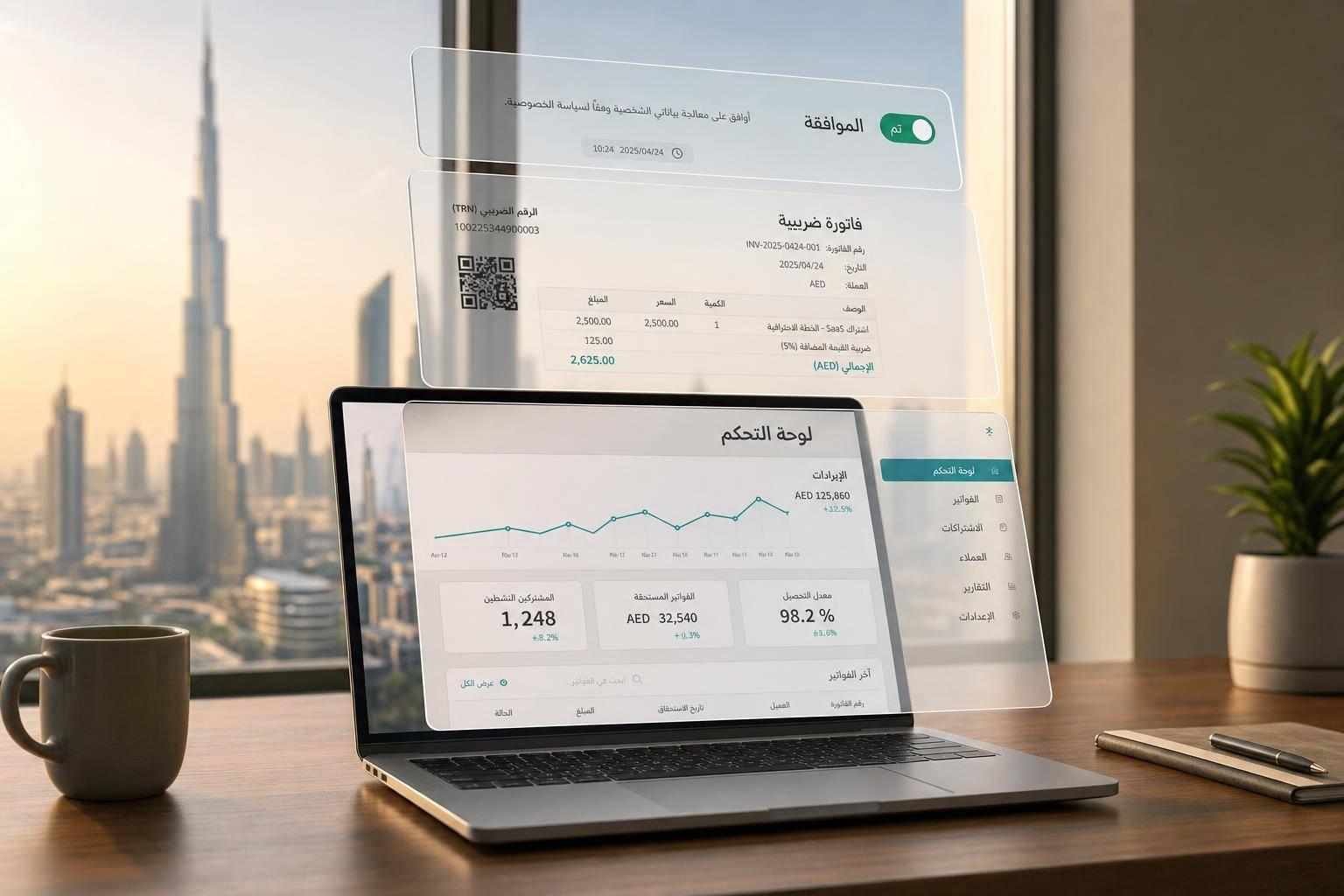
Building in MENA? You don't have to do it alone.
Join 300+ founders in the Founder Connects Residency. Monthly squad calls, warm intros, $3M+ in perks, and much more. All for less than your monthly coffee budget.

If I had to sum it up in one line: UAE startups win new SaaS markets when they localise the product, billing, compliance, demos, and support - not just the words on the screen.
I’d treat this as a product job first. The article shows that teams need to set up i18n early, support Arabic and RTL, use local pricing like AED 1,200.50, fix forms for UAE users, localise invoices and payment methods, and store consent records by market. It also points to a hard business case: Arabic-localised screenshots can lift enterprise conversion by 25% to 40%, while English-only UI can block about 60% of enterprise deals in KSA and the UAE.
Here’s the short version:
- Pick markets first based on demand, rules, and support load
- Build i18n before launch so text, dates, currency, and tax logic are not hardcoded
- Plan for Arabic from day one, including RTL layouts and longer text
- Fix onboarding and forms for local address, phone, and identity needs
- Match billing to the market with VAT-ready invoices, local currency, and local payment rails
- Version consent and policy records so legal and support teams can trace what each user accepted
- Localise demos and sales assets so buyers see the product in their own market context
- Track results by locale across activation, paid conversion, churn, payment failure, and support time
A quick snapshot of the article’s main focus areas:
| Area | What I’d change first | Why it matters |
|---|---|---|
| Product setup | Externalise UI copy, dates, currency, tax rules | Cuts rebuild work later |
| Arabic UX | RTL, mirrored navigation, flexible layouts | Arabic text runs 25–30% longer |
| Onboarding | UAE-friendly forms, Arabic/English choice | Helps first-session completion |
| Billing | AED/SAR pricing, VAT invoices, FATOORA where needed | Deal flow often breaks here |
| Compliance | Versioned consent, local data-hosting notes | Helps with audits and partner checks |
| Sales | Arabic decks, local screenshots, market-fit demos | Builds buyer confidence early |
| Support | Bilingual emails, local hours, WhatsApp where fit | Keeps post-sale experience aligned |
So my takeaway is simple: localisation is not a copy pass. It is a market-entry system. If I were launching in the GCC, Europe, or Asia, I’d use this article as a checklist for what needs to change before I spend more on sales.
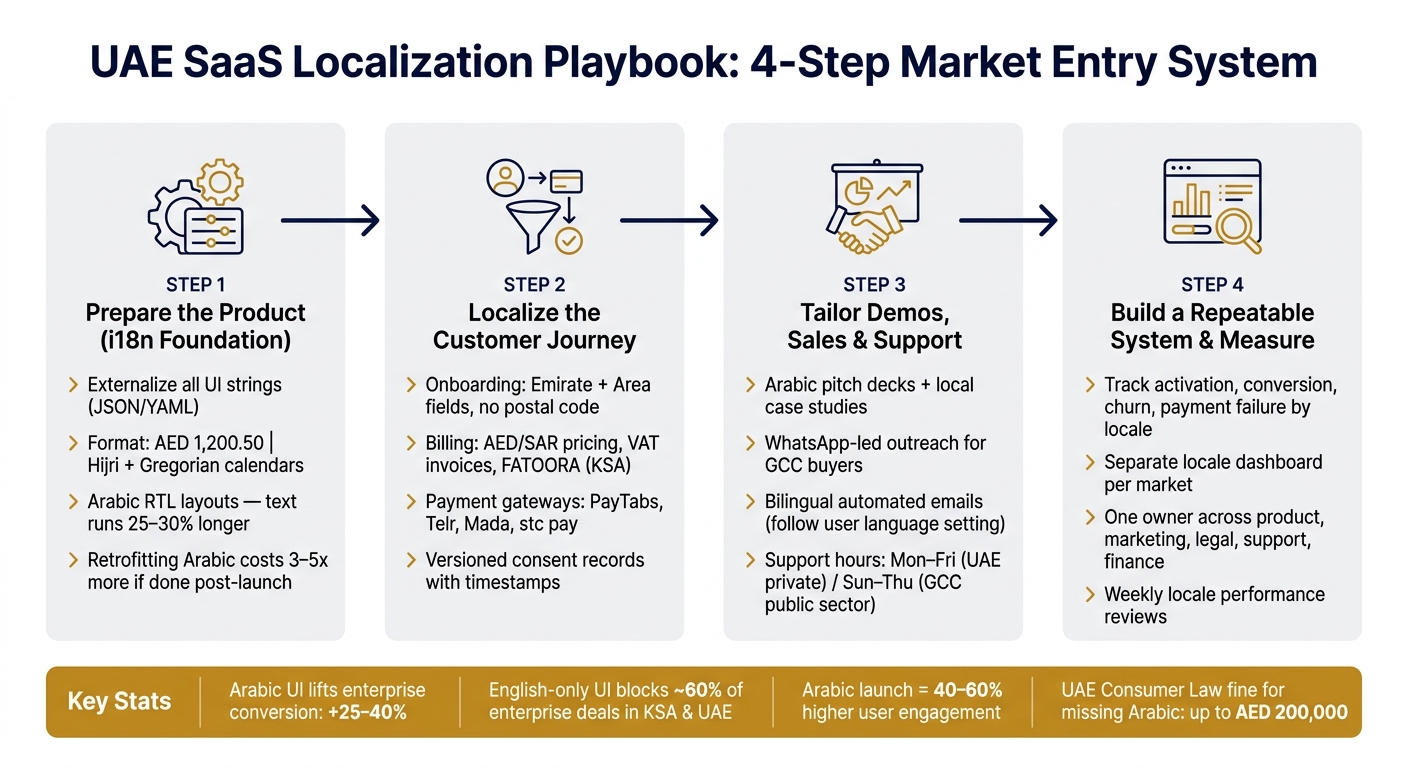
UAE SaaS Localization Playbook: 4-Step Market Entry System
Step 1: Prepare the product for localisation
Before localisation starts, the product needs to support different languages, formats, and layouts. That’s the internationalisation (i18n) layer. Skip this step, and you’ll likely pay for it later with expensive rework.
Set up internationalisation for copy, currencies, and formats
Don’t hardcode user-facing text. Every UI string - button labels, error messages, tooltips, and email subjects - should sit in external localisation files like JSON or YAML.
It’s not just about text, either. Locale-specific formatting needs to work properly across the product. That means showing currency as AED 1,200.50, supporting both Gregorian and Hijri calendars, and formatting dates and numbers for each market.
Tax, fees, and KYC rules should live in a configurable layer, not inside core application code. If a field touches compliance, legal, payments, or banking, make it configurable.
For UAE forms, don’t make postal code a required field. Use Emirate and Area instead.
With the core product localised, the next weak spot is usually the customer journey.
Plan for Arabic and right-to-left layouts from the start
Arabic isn’t a nice-to-have that you tack on later. It changes how the interface works. Navigation, progress bars, labels, and back arrows need to mirror for RTL. Arabic text also runs 25–30% longer than the English version, so your layouts need flexible containers from day one [3].
Font choice matters too. Cairo is a good fit for modern UI elements, Tajawal works well for body text, and IBM Plex Arabic suits fintech or enterprise products.
Arabic is also tied to compliance. Under Article 26 of the UAE Consumer Protection Law, trading information shown in an app must be available in Arabic. If it isn’t, fines can reach AED 200,000 [3].
There’s also a cost angle. Retrofitting Arabic after launch usually costs 3–5x more than building it in from the start. And apps that launch with Arabic support from day one see 40–60% higher user engagement in the UAE market [3].
Once that base is in place, you can localise the rest of the journey without tearing things apart later. After the interface is ready, move on to signup, pricing, payment, and consent flows for each market.
Step 2: Localise the customer journey from signup to payment
Once i18n is set up, the next job is to localise the full path from signup to payment. These touchpoints have a direct effect on activation and conversion, so it pays to fix them early.
Update onboarding and in-app copy for each market
At first launch, let users pick Arabic or English themselves. Don’t guess based on device settings.
Then go field by field through your forms. They need to match how people in each market actually enter their details. In the UAE, address forms should remove the postal code field and use dropdowns for Emirate, Area, Building Name, and Flat Number [3]. Phone number inputs should accept UAE formats by default.
For language style, use MSA in the UI and Khaleeji in push notifications and marketing copy. Terms with Sharia sensitivity should stay configurable, such as profit-sharing versus interest [1].
It’s easy to skip past empty states, tooltips, and error messages. That’s a mistake. Those small moments shape whether a new user feels at ease or gets stuck. Write them in the local register instead of translating English defaults line by line.
Once the first-session experience feels local, move to pricing, invoicing, and payments.
Localise billing, pricing, and payment methods
Billing is where many UAE tech startups lose deals they could have closed.
Show prices in the local currency with the right format: AED 1,200.50 in the UAE, SAR in Saudi Arabia, and so on. GCC enterprise buyers tend to prefer annual contracts with upfront payment instead of monthly subscriptions, which can come across as transactional and low-commitment [4]. If your checkout only offers monthly billing, it doesn’t match how procurement works in this region.
Invoices should be VAT-compliant and available in both Arabic and English. In Saudi Arabia, ZATCA’s FATOORA e-invoicing integration is mandatory - one founder learned that the hard way:
"As a GCC SaaS founder, our timeline ballooned because we ignored FATOORA's specifics and had to re-architect billing from scratch." - Ershadul Hoque, CEO, Riseup Labs [2]
For payments, gateways such as PayTabs, Telr, or Network International can support local payment flows. Add Mada, stc pay, or SADAD where they fit. Billing rules should also change by market. GCC buyers expect VAT-compliant annual invoices with no zip codes, European markets usually use a monthly/annual mix with standard postal formats, and Southeast Asia leans more towards mobile wallets and micro-payments.
After payment flows are sorted, the next step is consent and policy records by region.
Update compliance pages and consent flows by region
Compliance pages often get treated like boilerplate. They shouldn’t. You need a precise record of what a user agreed to - and which version of the disclosure they saw - especially during partner diligence or a regulatory review [1].
Build your terms of service, privacy policy, and cookie notices as versioned content in a configuration layer, not as static pages. Each record should store the full text shown, the timestamp, the app version, and the consent version the user accepted. Consent records should be handled as audit data.
Data residency matters even more in regulated sectors. If your product handles financial, health, or government data, your privacy policy should state clearly where that data is stored, whether that’s AWS UAE, Azure KSA, or G42 Cloud [2][4].
| Requirement | UAE (PDPL / Consumer Law) | KSA (PDPL / ZATCA) | Europe (GDPR) |
|---|---|---|---|
| Language | Arabic mandatory for contracts and ads [3] | Arabic required for government-facing content | Local language recommended |
| Data Residency | Strong preference for local cloud [2] | Explicit restrictions on external transfer [2] | Cross-border allowed with safeguards |
| Invoicing | VAT-compliant (5%) [2] | FATOORA e-invoicing via ZATCA [2] | Standard VAT/tax invoices |
| Identity Verification | UAE PASS integration [3] | Absher / IAM integration | OAuth / social / national ID |
For UAE fintech and healthcare products, integrating UAE PASS - the national digital identity platform - is a strong trust signal during signup [3]. It can also cut friction for users.
Once signup, billing, and consent are working locally, the next layer is demos, sales assets, and support.
sbb-itb-f597d8f
Step 3: Tailor demos, sales assets, and support for local buyers
Once billing and compliance are in place, the next thing that matters is what buyers see before they sign. If a demo shows US$ pricing or asks for a Zip Code, a GCC procurement team may take that as a sign that the product wasn’t made for their market. That’s the point where trust can slip. Every buyer-facing touchpoint should feel local before the first call.
Build market-specific demo flows and sales collateral
Your demo should look and feel like it belongs in the buyer’s market. That means using local currency, local date formats, and compliance screens that fit the market.
Sales collateral needs that same level of care. Arabic-language pitch decks and one-pagers help internal champions share the product with non-English-speaking stakeholders without losing detail in translation. It also helps to lead with a local case study that matches the buyer’s sector.
For outreach and follow-up, use WhatsApp in markets where buyers already use it to make decisions. That’s often where the conversation keeps moving.
Once the demo feels native, support and follow-up need to match that standard.
Localise help content, emails, and support coverage
Write help articles in MSA. For live chat, WhatsApp, and follow-up emails, use Gulf Arabic.
Automated emails matter more than many teams think. If a user sets their interface to Arabic, they should not get a password reset or billing receipt in English. Your bilingual notification pipeline should follow the user’s app setting, not the sender’s default.
Support hours should also match the buyer’s market:
- Monday to Friday for UAE private-sector customers
- Sunday to Thursday for some GCC public-sector accounts
| Support Model | Best For | Key Characteristics |
|---|---|---|
| Self-Serve | SMBs / low-cost SaaS | Knowledge base in Arabic/English, automated bots |
| Knowledge base + chat | Mid-market | WhatsApp-led support, AI-driven multilingual chatbots |
| Dedicated local team | Enterprise / government | Dedicated account managers, local time zone alignment |
For regulated products in fintech or healthcare, support teams also need access to the exact version of consent text a user accepted, with a timestamp, to handle complaints or regulatory reviews cleanly. [1] That isn’t just a legal team issue. It’s a support infrastructure choice made early in the build.
After the buyer journey is local, standardise ownership and metrics in the next step.
Step 4: Build a repeatable localisation process and measure results
Once the localised journey is live, track what happens next and push those lessons back into product and operations. Localisation only pays off over time when it runs like a repeatable system, with clear owners, defined workflows, and metrics the team checks often.
Assign ownership across product, marketing, legal, and support
Localisation is a growth lever, not just a marketing task. Product, marketing, legal, support, and finance should work under one owner and one roadmap.
Keep market-specific settings separate from the core product. That way, language packs, KYC rules, disclosures, and pricing can change without rebuilding whole flows. Anything that needs legal, compliance, or Sharia approval should sit behind a configuration lever, not hardcoded logic [1]. That makes re-approvals and redeployments faster when rules shift.
Those owners should review locale performance every week and rank fixes by impact.
Track activation, conversion, churn, and support tickets by locale
Track activation, conversion, churn, payment failure, and support resolution by country and currency [5]. A separate dashboard for each locale helps the team spot issues early, before they turn into bigger problems.
| Metric | What It Tells You |
|---|---|
| Activation rate per region | Whether localised onboarding is guiding users to their first value moment |
| Paid conversion by currency or language | Whether local pricing and translated interfaces are reducing friction |
| Churn rate by country | Whether localised support and product-market fit are holding |
| Payment failure rate | Whether local payment methods are missing or improperly integrated |
| Support resolution time by language | Whether help content or support coverage needs work in that locale |
If users in one locale keep dropping off during signup, check the RTL layout or the localised KYC flow for friction before deciding the market is not a fit [1][3].
Conclusion: A localisation playbook for UAE founders
Localisation works when product, pricing, compliance, sales, and support run as one repeatable system.
For UAE founders working through these choices, Founder Connects is a useful place to pressure-test your localisation approach. The community brings together UAE tech startup founders through group-matched virtual masterminds and expert-led sessions, where you can share what is working by market, get peer feedback on your compliance setup, and learn from founders who’ve already gone through GCC expansion.
FAQs
What should we localise first?
Don’t localise the entire platform in one go. Start with the revenue path first: paid landing pages, demo flows, pricing context, and trust signals like testimonials, security language, and social proof.
Then make sure your product supports internationalisation properly. That means locale-aware dates, currencies, and numbers. In the GCC, put compliance, data residency, and Arabic-first logic high on the list, including RTL support from the start.
When should Arabic and RTL support start?
For UAE tech startups, Arabic and RTL support should sit at the heart of product development from day one. Don’t treat RTL like a last-minute UI patch. Treat it as a core product setting. That’s how you build trust and give users an experience that feels native, smooth, and made for them.
Starting early also saves pain later. If your team hardcodes LTR layouts from the start, fixes can get messy and expensive fast. You end up dealing with broken flows, awkward screens, and code that fights you at every turn. Build for Arabic and RTL early, and you give your product a much stronger base for growth across the GCC.
How do we measure localisation ROI?
Measure localisation ROI by market with a small set of numbers that show what’s happening on the ground: activation, trial-to-paid conversion, churn, and support ticket volume. That gives you a clear view of whether localised work is helping people get started, stick around, and pay.
Then compare your localisation cost per user or per market with the revenue lift from each region. Put simply: if you’re spending more to localise for a market, is that market bringing in more money?
Review the results every quarter. Look at CAC against LTV, and pair those figures with user interviews so you can understand the story behind the numbers. A dashboard can show a drop or spike. Talking to users helps explain why it happened.
For UAE startups, it makes sense to track figures in AED. That way, you can see more clearly whether localisation is leading to actual growth in each market.
Related Blog Posts

Building in MENA? You don't have to do it alone.
Join 300+ founders in the Founder Connects Residency. Monthly squad calls, warm intros, $3M+ in perks, and much more. All for less than your monthly coffee budget.
Popular posts





Founder Connects is a premium MENA tech founder community. Meetups in Dubai and across MENA, Residency Squads of 8–10, and 400+ vetted WhatsApp founders (apply and screened).